CEIR Portal 2026 Block, Track, Recover Lost or Stolen Mobile Phone, IMEI Blocking, Registration, Login & Complaint Status Check Online
Managing a lost or stolen mobile phone is stressful for anyone. The CEIR Portal 2026 helps users block IMEI, track devices, and recover mobile phones online. This guide was last updated on July 8, 2026, with information verified from official government sources and the Department of Telecommunications (DoT), Government of India.
The CEIR Portal offers a simple process for registration, login, IMEI blocking, and complaint status checking. Users can also unblock recovered devices through the official portal. Every step is designed to protect your mobile and personal data.
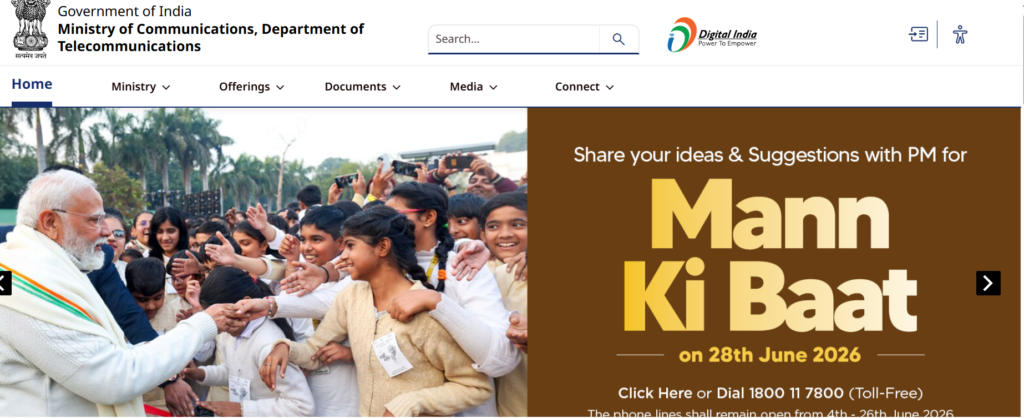
What is CEIR Portal?
The CEIR Portal (Central Equipment Identity Register) is an official online platform launched by the Department of Telecommunications (DoT), Government of India. It helps people block, track, and recover lost or stolen mobile phones using their device’s IMEI (International Mobile Equipment Identity) number. The portal also prevents blocked phones from being used on Indian mobile networks, helping reduce mobile theft and misuse.
Users can register a complaint after filing a police report and obtaining the required documents. Once the request is verified, the CEIR Portal blocks the device across supported telecom networks. If the phone is recovered later, users can submit an online request to unblock the IMEI. The portal also allows users to check complaint status, making the entire process transparent, secure, and easy to follow.
CEIR Portal 2026 Overview
| Particular | Details |
|---|---|
| Portal Name | CEIR Portal (Central Equipment Identity Register) |
| Launched By | Department of Telecommunications (DoT), Government of India |
| Purpose | Block, track, and recover lost or stolen mobile phones |
| Year | 2026 |
| Primary Service | IMEI Blocking and Mobile Recovery |
| Beneficiaries | Mobile phone users across India |
| Registration Mode | Online |
| Login Facility | Available through the official portal |
| Main Services | IMEI Blocking, IMEI Unblocking, Complaint Registration, Complaint Status Check |
| Documents Required | Police FIR/Complaint, Mobile IMEI Number, Identity Proof, Mobile Purchase Invoice (if available) |
| Complaint Status | Can be checked online using the Request ID |
| Supported Devices | Lost or stolen mobile phones with a valid IMEI number |
| Official Authority | Department of Telecommunications (DoT) |
| Official Website | https://www.ceir.gov.in/ |
Key Features of CEIR Portal
The CEIR Portal provides several useful services to help users secure their lost or stolen mobile phones. It allows quick IMEI blocking, preventing unauthorized use of the device on supported telecom networks. Users can also register complaints online, track request progress, and unblock the device if it is recovered. The portal offers a secure and user-friendly interface, making the entire process simple.
Some of the major features of the CEIR Portal include:
- Online IMEI Blocking for lost or stolen mobile phones.
- Complaint Registration through a simple online application form.
- Complaint Status Tracking using the generated Request ID.
- IMEI Unblocking after successful recovery of the mobile phone.
- Integration with Telecom Operators to restrict blocked devices from network access.
- Support for Police Verification during the recovery process.
- Secure Digital Platform managed by the Department of Telecommunications (DoT).
- Easy-to-Use Interface for fast registration and status checking.
- Nationwide Service Availability across participating telecom networks in India.
- Free Online Service for citizens without any registration fee.
Benefits of Using CEIR Portal
The CEIR Portal offers several advantages for people who lose their mobile phones or become victims of theft. It helps protect personal information by blocking the IMEI number, making it difficult for others to use the device on Indian telecom networks. The portal also simplifies the complaint process through a secure online system.
Some of the key benefits of using the CEIR Portal are:
- Blocks Lost or Stolen Mobile Phones to prevent unauthorized network usage.
- Protects Personal Data stored on the missing device.
- Improves Chances of Mobile Recovery through coordination with telecom operators and law enforcement.
- Online Complaint Registration without visiting multiple offices.
- Easy Complaint Status Tracking using the Request ID.
- IMEI Unblocking Facility after the phone is recovered.
- Free Government Service available for eligible users.
- Reduces Mobile Phone Misuse by preventing blocked devices from accessing supported networks.
- Simple and User-Friendly Process suitable for all users.
- Available Across India through the Department of Telecommunications (DoT).
Who Can Use the CEIR Portal?
The CEIR Portal is available for anyone in India whose mobile phone has been lost or stolen. It is designed for individuals who want to block their device’s IMEI number, protect personal data, and improve the chances of recovering their phone. Users should have the required details, such as the IMEI number and a police complaint or FIR, before submitting a request.
The following users can use the CEIR Portal:
- Indian citizens whose mobile phone has been lost or stolen.
- Residents of India using a valid mobile device with an IMEI number.
- Individuals with a police complaint or FIR related to the lost or stolen phone.
- Users who know their mobile phone’s IMEI number.
- People who want to block the IMEI to prevent unauthorized use.
- Users who have recovered their phone and want to unblock the IMEI.
- Owners of smartphones and feature phones with valid IMEI numbers.
- Anyone seeking to check the complaint status after submitting a CEIR request.
Documents Required for CEIR Portal Registration
Before submitting a request on the CEIR Portal, keep all required documents and information ready. The Department of Telecommunications (DoT) requires users to upload a police report and identity proof. You should also have a duplicate SIM card for the lost mobile number, as an OTP is sent to that number during the request process. A mobile purchase invoice is optional but recommended.
| Document | Purpose |
|---|---|
| Police FIR/Complaint Copy | Mandatory proof that the mobile phone was lost or stolen. |
| Identity Proof | Required for identity verification (such as Masked Aadhaar, Passport, Voter ID, Driving Licence, or PAN, as applicable). |
| Duplicate SIM Card | Needed to receive OTP on the registered mobile number during verification. |
| Mobile IMEI Number | Required to block and identify the lost or stolen device. |
| Mobile Purchase Invoice (Optional) | Helps establish ownership of the mobile phone. |
| Mobile Brand and Model Details | Required while filling the online application form. |
| Lost Mobile Number | The number that was active in the lost or stolen phone. |
| Active Email Address | Used to receive updates and communication related to the request. |
Note: If you upload an Aadhaar card as identity proof, the CEIR portal instructs users to upload a Masked Aadhaar instead of the full Aadhaar copy for better privacy protection.
Information Required Before Blocking a Mobile Phone
Before you submit a mobile IMEI blocking request on the CEIR Portal, make sure you have all the necessary details ready. Providing accurate information helps the Department of Telecommunications (DoT) process your request faster and reduces the chances of rejection. Double-check every detail before submitting the online form.
The following information is required before blocking a lost or stolen mobile phone:
| Required Information | Description |
|---|---|
| Mobile IMEI Number | The 15-digit IMEI number of the lost or stolen device. |
| Mobile Number | The phone number that was being used in the lost device. |
| Duplicate SIM Number | A replacement SIM of the same mobile number to receive the OTP. |
| Mobile Brand and Model | Name and model number of the lost or stolen phone. |
| Date and Place of Loss | The approximate date and location where the phone was lost or stolen. |
| Police Complaint/FIR Number | The complaint or FIR number issued by the police. |
| Police Station Details | Name of the police station where the complaint was registered. |
| Identity Proof | A valid government-issued ID for verification. |
| Email Address | A working email ID to receive updates and notifications. |
| Purchase Invoice (Optional) | Mobile purchase bill or proof of ownership, if available. |
Tip: You can find your IMEI number on the mobile box, purchase invoice, or by dialing
*#06#if you still have access to the device.
How to Block a Lost or Stolen Mobile Phone on CEIR Portal
If your mobile phone is lost or stolen, you should block its IMEI number as soon as possible. This helps prevent unauthorized use of your device on Indian telecom networks. Before starting the process, file a police complaint, get a duplicate SIM card for the lost number, and keep your identity proof, IMEI number, and other required documents ready.
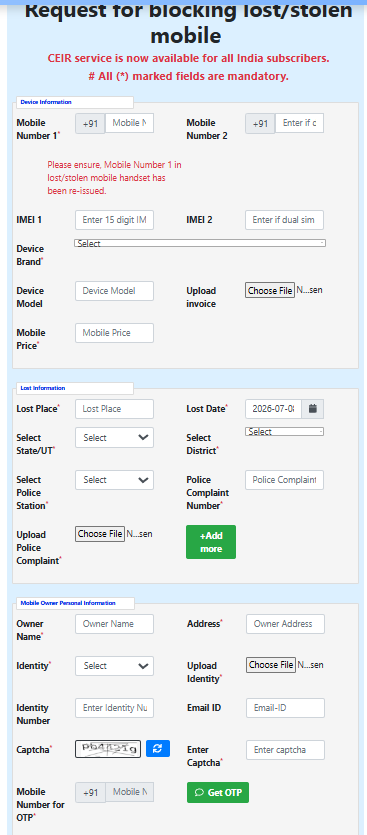
Follow these steps to block your mobile phone through the CEIR Portal:
- Visit the official CEIR Portal.
- Click on Block Stolen/Lost Mobile.
- Enter your mobile number and 15-digit IMEI number.
- Fill in your mobile brand, model, and device details.
- Provide the date and place where the phone was lost or stolen.
- Enter your police complaint/FIR details.
- Upload the required documents, including identity proof and the police complaint copy.
- Verify your duplicate SIM number using the OTP received.
- Review all the information carefully.
- Click Submit to send your blocking request.
- Save the Request ID generated after successful submission.
- Use the Request ID later to check the complaint status or unblock the IMEI if your phone is recovered. After approval, the IMEI is generally blocked within 24 hours, while police can still trace the device.
How to Track a Lost Mobile Phone Through CEIR Portal
After submitting a mobile blocking request on the CEIR Portal, you can monitor the progress of your complaint. The portal does not provide a live GPS location of your phone. Instead, it works with telecom service providers and law enforcement agencies to identify and trace the device when it connects to a mobile network. You can also check the status of your request online using the Request ID provided after registration.
Follow these steps to track your lost mobile phone through the CEIR Portal:
- Visit the official CEIR Portal.
- Open the Check Request Status option.
- Enter your Request ID received after submitting the blocking request.
- Provide your registered mobile number, if required.
- Complete the OTP verification process.
- Click on Submit or Check Status.
- View the latest status of your complaint on the screen.
- If the device is detected on a telecom network, the information is shared with the concerned police authorities for further action.
- Keep your Request ID safe until your complaint is resolved.
- If your mobile phone is recovered, submit an IMEI unblocking request through the portal to reactivate the device.
How to Recover a Lost Mobile Phone Using CEIR
The CEIR Portal helps improve the chances of recovering a lost or stolen mobile phone by working with telecom operators and law enforcement agencies. Once your IMEI number is blocked and the complaint is verified, the system monitors the device when it connects to a supported mobile network. If the phone is found, the concerned police authorities are informed to take further action.
Follow these steps to recover your lost mobile phone using the CEIR Portal:
- File a police complaint or FIR immediately after losing your phone.
- Get a duplicate SIM card for your registered mobile number.
- Visit the CEIR Portal and submit an IMEI blocking request.
- Upload all the required documents and complete the OTP verification.
- Save the Request ID generated after successful submission.
- Regularly check your complaint status through the portal.
- Cooperate with the police authorities if additional information is requested.
- Wait for updates if the device is detected on a telecom network.
- Collect your mobile phone after verification if it is recovered by the authorities.
- Submit an IMEI unblocking request on the CEIR Portal to restore normal network access after receiving your device.
How to Check CEIR Complaint Status Online
After submitting your CEIR Portal application, you can easily check the progress of your request online. You only need your Request ID (Complaint ID) and the registered mobile number used during registration. The portal verifies your identity through an OTP before displaying the latest complaint status.
Follow these steps to check your CEIR complaint status online:
- Visit the official CEIR Portal.
- Click on the Check Request Status option.
- Enter your Request ID or Complaint Number.
- Type the Captcha Code shown on the screen.
- Click the Submit button.
- If prompted, enter the OTP sent to your registered mobile number.
- Click Verify to continue.
- Your complaint status will appear on the screen.
- Note the latest update and follow any instructions provided by the portal.
- If your mobile phone is recovered, submit an IMEI Unblocking Request through the portal.
How to Unblock a Recovered Mobile Phone on CEIR Portal
If your lost or stolen mobile phone has been recovered, you should unblock its IMEI number through the CEIR Portal. Unblocking restores the device so it can be used normally on Indian telecom networks again. Before submitting the request, inform the local police that your phone has been recovered and keep your Request ID and registered mobile number ready.
Follow these steps to unblock your recovered mobile phone:
- Visit the official CEIR Portal.
- Click on the Un-Block Found Mobile option.
- Enter your Request ID received during the IMEI blocking process.
- Enter your registered mobile number.
- Provide the reason for unblocking.
- Enter the Captcha Code displayed on the screen.
- Click Get OTP to receive a verification code.
- Enter the OTP sent to your registered mobile number.
- Click Verify OTP and then Submit your request.
- Wait for confirmation that your IMEI has been unblocked. Once approved, your mobile phone can be used normally on supported telecom networks.
CEIR Portal Login Process
The CEIR Portal is available through the Sanchar Saathi platform managed by the Department of Telecommunications (DoT). Users can sign in to access CEIR services such as Block Stolen/Lost Mobile, Un-Block Found Mobile, Check Request Status, and Forgot Request ID.
Follow these steps to access the CEIR Portal:
- Visit the official CEIR Portal: CEIR Portal
- Click on Proceed to Sign In on the homepage.
- Enter your registered credentials if prompted.
- Complete the required verification process.
- After signing in, choose the required service:
- Block Stolen/Lost Mobile
- Un-Block Found Mobile
- Check Request Status
- Forgot Request ID
- Fill in the required details for the selected service.
- Submit the request and keep the generated Request ID for future reference.
Note: Most citizen services on the CEIR Portal, such as blocking a lost mobile, checking complaint status, and unblocking a recovered phone, can be accessed directly without creating a separate user account. Users only need their Request ID, registered mobile number, and OTP verification to use these services.
CEIR Portal Registration Process
Registering a complaint on the CEIR Portal is simple if you have the required documents ready. Before starting, file a police complaint or FIR, obtain a duplicate SIM card for your lost mobile number, and keep your IMEI number, identity proof, and mobile details available. After successful registration, the portal generates a Request ID that can be used to track your complaint and unblock the device if it is recovered.
Follow these steps to complete the CEIR Portal registration process:
- Visit the official CEIR Portal.
- Click on Block Stolen/Lost Mobile.
- Enter your mobile number and 15-digit IMEI number.
- Fill in the mobile brand, model, and other device details.
- Enter the date, time, and place where the mobile phone was lost or stolen.
- Provide your police complaint/FIR number and police station details.
- Upload the required documents, including identity proof and the police complaint copy.
- Enter your email address and other contact information.
- Verify your registered mobile number using the OTP received on your duplicate SIM.
- Review all the details carefully and click Submit.
- After successful registration, note down the Request ID displayed on the screen and sent to your registered email.
- Use the Request ID later to check complaint status or unblock the IMEI if your mobile phone is recovered.
CEIR Portal Services List
| Service | Description |
|---|---|
| Block Stolen/Lost Mobile | Block the IMEI of a lost or stolen mobile phone to prevent misuse on telecom networks. |
| Un-Block Found Mobile | Remove the IMEI block after the lost mobile phone has been recovered. |
| Check Request Status | Track the progress of your IMEI blocking or unblocking request using the Request ID. |
| Forgot Request ID | Retrieve your Request ID if you have misplaced it. |
| IMEI Verification (Know Your Mobile) | Check whether a mobile phone’s IMEI is genuine, blacklisted, duplicated, or already in use before buying it. |
| Online Complaint Submission | Submit a request to block a lost or stolen mobile phone through the portal. |
| OTP-Based Verification | Secure verification of users through OTP during request submission and updates. |
| Request Management | View and manage the status of submitted CEIR requests. |
| Help & Support | Access user manuals, FAQs, and assistance for CEIR services. |
| Public Notices | View official announcements and updates related to CEIR services. (CEIR) |
CEIR Portal State-Wise Availability
The CEIR Portal is available across all States and Union Territories of India. It is managed by the Department of Telecommunications (DoT) and works in coordination with telecom service providers and law enforcement agencies. Citizens from any participating State/UT can report a lost or stolen mobile phone, block its IMEI number, check the complaint status, and request IMEI unblocking after the device is recovered. The official CEIR dashboard also publishes state-wise statistics for blocked, traced, and recovered mobile phones.
| State / Union Territory | CEIR Services Available |
|---|---|
| Andhra Pradesh | ✅ Available |
| Arunachal Pradesh | ✅ Available |
| Assam | ✅ Available |
| Bihar | ✅ Available |
| Chhattisgarh | ✅ Available |
| Goa | ✅ Available |
| Gujarat | ✅ Available |
| Haryana | ✅ Available |
| Himachal Pradesh | ✅ Available |
| Jharkhand | ✅ Available |
| Karnataka | ✅ Available |
| Kerala | ✅ Available |
| Madhya Pradesh | ✅ Available |
| Maharashtra | ✅ Available |
| Manipur | ✅ Available |
| Meghalaya | ✅ Available |
| Mizoram | ✅ Available |
| Nagaland | ✅ Available |
| Odisha | ✅ Available |
| Punjab | ✅ Available |
| Rajasthan | ✅ Available |
| Sikkim | ✅ Available |
| Tamil Nadu | ✅ Available |
| Telangana | ✅ Available |
| Tripura | ✅ Available |
| Uttar Pradesh | ✅ Available |
| Uttarakhand | ✅ Available |
| West Bengal | ✅ Available |
| NCT of Delhi | ✅ Available |
| Jammu & Kashmir | ✅ Available |
| Ladakh | ✅ Available |
| Andaman & Nicobar Islands | ✅ Available |
| Chandigarh | ✅ Available |
| Dadra & Nagar Haveli and Daman & Diu | ✅ Available |
| Lakshadweep | ✅ Available |
| Puducherry | ✅ Available |
Note: The availability of services is nationwide. However, the speed of tracing and recovery may vary depending on the investigation by the concerned police authorities, telecom operators, and local administrative procedures.
Common Reasons for CEIR Request Rejection
A CEIR Portal request may be rejected if the information provided is incorrect, incomplete, or cannot be verified. To avoid delays, ensure that all details match your police complaint, IMEI number, and identity proof before submitting the application. Accurate information improves the chances of successful processing.
Some of the most common reasons for CEIR request rejection include:
| Reason | Description |
|---|---|
| Incorrect IMEI Number | The entered IMEI number is invalid, incomplete, or does not match the lost device. |
| Missing Police Complaint/FIR | A valid police complaint or FIR was not provided or contains incorrect details. |
| Invalid Identity Proof | The uploaded ID proof is unclear, expired, or does not match the applicant’s details. |
| Incorrect Mobile Number | The registered mobile number is entered incorrectly or cannot receive OTPs. |
| OTP Verification Failure | The OTP verification process was not completed successfully. |
| Incomplete Application Form | Mandatory fields were left blank or filled with incorrect information. |
| Unreadable Document Uploads | Uploaded documents are blurred, cropped, or in an unsupported format. |
| Mismatch in Applicant Details | The information entered does not match the supporting documents. |
| Duplicate Request | A request for the same IMEI has already been submitted and is under processing. |
| False or Misleading Information | Providing incorrect or fraudulent information may lead to rejection of the application. |
Tip: Before submitting your request, carefully review all details, upload clear documents, and ensure your IMEI number, mobile number, and police complaint details are accurate. This helps reduce the chances of rejection and speeds up the verification process.
Tips to Increase the Chances of Recovering Your Mobile Phone
Recovering a lost or stolen mobile phone depends on how quickly you act after the incident. Reporting the loss immediately and using the CEIR Portal can improve the chances of tracing your device. You should also cooperate with the police authorities and provide accurate information throughout the investigation.
Follow these tips to increase the chances of recovering your mobile phone:
| Tip | Benefit |
|---|---|
| File a Police Complaint Immediately | Helps start the official investigation without delay. |
| Block the IMEI on CEIR Portal | Prevents unauthorized use of your mobile phone on telecom networks. |
| Keep Your IMEI Number Safe | Makes it easier to identify and trace the device. |
| Use a Duplicate SIM Card | Allows you to receive OTPs and updates from the CEIR Portal. |
| Provide Accurate Information | Reduces verification delays and improves request processing. |
| Upload Clear Documents | Helps authorities verify your application quickly. |
| Check Complaint Status Regularly | Keeps you informed about the latest progress. |
| Cooperate with Police Authorities | Respond promptly if additional details or documents are requested. |
| Keep the Request ID Secure | Required for tracking your complaint and unblocking the device after recovery. |
| Do Not Purchase a Replacement Phone Immediately | Wait for the investigation if there is a reasonable chance of recovering your original device. |
Important: The CEIR Portal increases the chances of recovery by helping block and identify devices on telecom networks. However, mobile recovery is not guaranteed and depends on factors such as police investigation, network detection, and whether the device is found.
CEIR Portal Helpline Number and Support
| Support Service | Details |
|---|---|
| Portal Name | CEIR (Central Equipment Identity Register) |
| Managed By | Department of Telecommunications (DoT), Government of India |
| Helpdesk Email | help-sancharsaathi@gov.in |
| Support Services | IMEI Blocking, IMEI Unblocking, Complaint Registration, Complaint Status, Request ID Assistance |
| User Manual | Available on the official CEIR Help section |
| FAQs | Available on the official CEIR Portal |
| Feedback Facility | Users can submit feedback through the Contact Us page |
| Official Website | CEIR Portal |
Difference Between CEIR Portal and Police FIR
The CEIR Portal and a Police FIR serve different purposes when a mobile phone is lost or stolen. A Police FIR (First Information Report) is an official legal record that starts the police investigation. In contrast, the CEIR Portal is an online platform that helps users block the IMEI, track the complaint, and request IMEI unblocking after the device is recovered. In most cases, filing a police complaint is required before submitting a request on the CEIR Portal.
| Feature | CEIR Portal | Police FIR |
|---|---|---|
| Purpose | Block, track, and manage lost or stolen mobile phones. | Register a legal complaint and begin a police investigation. |
| Managed By | Department of Telecommunications (DoT). | State Police Department. |
| Mode | Online portal. | Online or offline, depending on the state police system. |
| Primary Function | IMEI blocking, complaint status, and IMEI unblocking. | Investigation and legal action regarding the lost or stolen phone. |
| Requirement | Requires mobile details, IMEI, and supporting documents. | Requires details of the incident and the lost or stolen device. |
| Investigation | Does not conduct investigations. | Police investigate the complaint and attempt recovery. |
| IMEI Blocking | Yes, blocks the device on supported telecom networks. | No, cannot block the IMEI. |
| Complaint Status | Can be tracked online using the Request ID. | Status depends on the police investigation process. |
| Recovery Role | Assists by identifying blocked devices on telecom networks. | Responsible for tracing and recovering the device. |
| Best Practice | Use after filing a police complaint or FIR. | File immediately after losing your mobile phone. |
Important: For the best chance of recovering a lost or stolen mobile phone, file a Police FIR first and then submit an IMEI blocking request on the CEIR Portal. Both systems work together but perform different roles.
Common Issues Faced on CEIR Portal and Their Solutions
| Common Issue | Possible Solution |
|---|---|
| OTP Not Received | Ensure your duplicate SIM is active, check network coverage, and request a new OTP after a few minutes. |
| Invalid IMEI Number | Verify that you entered the correct 15-digit IMEI number without any typing mistakes. |
| Unable to Submit the Form | Complete all mandatory fields and upload the required documents in the supported format. |
| Request ID Not Found | Check that you entered the correct Request ID or use the Forgot Request ID option. |
| Complaint Status Not Updated | Wait for the verification process to complete and check the status again later. |
| Document Upload Error | Upload clear, readable files within the permitted size and format limits. |
| OTP Verification Failed | Enter the latest OTP before it expires and ensure the registered mobile number is correct. |
| Website Not Loading | Refresh the page, clear your browser cache, or try using a different browser or internet connection. |
| Application Rejected | Review the rejection reason, correct the information, and submit a fresh request if required. |
| Recovered Phone Still Blocked | Submit an IMEI Unblocking Request through the CEIR Portal using your Request ID. |
Frequently Asked Questions (FAQs)
1. What is the CEIR Portal?
The CEIR Portal (Central Equipment Identity Register) is an official platform of the Department of Telecommunications (DoT). It allows users to block, track, and unblock the IMEI of lost or stolen mobile phones.
2. Is the CEIR Portal free to use?
Yes. The CEIR Portal is a free government service. Citizens can register complaints, block IMEI numbers, and check request status without paying any registration fee.
3. What is an IMEI number?
An IMEI (International Mobile Equipment Identity) is a unique 15-digit identification number assigned to every mobile phone. It helps identify and block a lost or stolen device.
4. Is filing a police complaint necessary before using the CEIR Portal?
Yes. Users should file a police complaint or FIR before submitting a request on the CEIR Portal. The complaint details are required during the application process.
5. Can I track the live location of my mobile phone through the CEIR Portal?
No. The CEIR Portal does not provide live GPS tracking. It helps identify the device when it connects to a telecom network and shares relevant information with law enforcement agencies.
6. How can I check my CEIR complaint status?
You can check your complaint status by visiting the CEIR Portal, selecting Check Request Status, and entering your Request ID.
7. What should I do if I recover my mobile phone?
If your phone is recovered, submit an IMEI Unblocking Request through the CEIR Portal using your Request ID. Once approved, your device can be used normally again.
8. Can I block more than one mobile phone on the CEIR Portal?
Yes. You can submit separate requests for each lost or stolen mobile phone, provided you have the required documents and IMEI details.
9. How long does it take to block an IMEI?
The request is processed after verification by the concerned authorities. Processing time may vary depending on document verification and system updates.
10. What should I do if I forget my Request ID?
Use the Forgot Request ID option available on the CEIR Portal. You can retrieve it by completing the required verification process.
Conclusion
The CEIR Portal 2026 is a valuable government initiative that helps users block, track, and recover lost or stolen mobile phones through a secure online system. By using the portal, you can quickly block your IMEI number, protect your personal data, check your complaint status, and unblock your device after recovery.
To improve the chances of recovering your mobile phone, always file a police complaint immediately, keep your IMEI number safe, and submit an accurate request on the CEIR Portal with all required documents. Following the correct procedure can reduce misuse of your device and support the recovery process. For the latest updates and official services, always use the Department of Telecommunications (DoT) CEIR Portal.